Entering your first professional project is like stepping into a dark room, tripping over something, apologizing, and only then turning on the light to realize you tripped over your own fear. It’s scary, confusing, full of strange tools and names that sound like RPG spells... but that’s exactly where real growth begins. This article is a complete, friendly, and humorous guide on what really happens when you dive into a large project — and how to survive, learn, and even have fun in the process.
1. The Initial Leap
For many beginners, this moment isn’t just a leap — it’s practically a leap of faith. This topic can be expanded by explaining that initial insecurity is one of the most universal feelings among junior developers. It's worth mentioning how facing this insecurity builds professional maturity. Often, when entering a large project, the beginner realizes that the concepts learned in college are just the surface of what it truly means to develop software at scale.

We can also expand on how important it is to set realistic expectations. In the beginning, no one masters everything: the code looks overly complex, the team’s workflow is new, and the tools are numerous. The goal is to show that this discomfort is part of the journey and that, over time, it turns into confidence and adaptability.
Starting your first professional project is like looking down from a 10-meter diving platform. You think:
“Am I really going to jump? Is there even water down there?”
The truth is simple: nobody feels ready. Not even the people who have been in the market for years. The difference is that those people have jumped a few times and know that, even if you hit the water hard, you come back to the surface.
Diving in headfirst is a turning point. Theory becomes practice. Insecurity becomes experience. And those mistakes you’re afraid of making? They will happen — and that’s a good thing. They’re what accelerate your learning curve.
2. The Reality Check
This topic can be enriched by explaining the psychological transition between the academic and professional environments. In college, exercises are designed to teach a specific concept; in the real world, code is written to solve real problems, serving clients, deadlines, and requirements that constantly change.
It’s also worth including descriptions of how beginners discover the huge difference between “code to learn” and “code to maintain.” Professional projects have years of history, layers of technical decisions, and a variety of programming styles accumulated by many contributors.
Another point that can be expanded is the emotional impact of this shock: many beginners feel afraid to ask questions, fear seeming incompetent, or believe that “everyone knows more than I do.” Understanding that this is normal greatly reduces pressure and makes adaptation easier.
There are memorable moments in a developer’s life: ● The first “Hello World” ● The first bug you fixed ● and the moment you open your first corporate repository.
It’s at that moment you realize:
“Oh... so this is how they actually program?”
The feeling? Something between controlled panic and fascination.
It’s like leaving a kiddie pool and suddenly finding yourself in the ocean. There are currents, depth, and unknown creatures (also known as old files), but there’s also room to grow, swim, and explore.
2.1. When the Repository Opens for the First Time
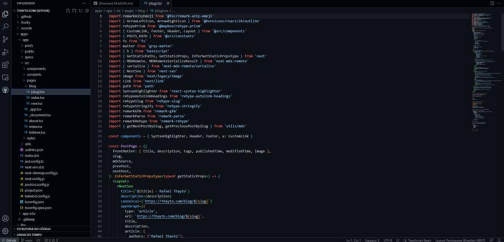
You run your first git clone and... surprise! Your screen fills with folders whose names seem obvious to people with years in the industry but completely alien to you.
controllers/
services/
repositories/
middlewares/
config/
docker/
And you think:
“Did I clone the right repository? This looks like an ecosystem.”
And that’s exactly what it is! Real projects grow organically. They carry old decisions, half-finished refactors, historic hacks, and modern modules all living together.
All of this is part of the beauty (and chaos) of professional software.
3. The First Major Skill: Reading Code
This is one of the most important topics, so it’s worth enriching it. We can explain that knowing how to read code is a skill as crucial — or even more crucial — than writing it.
Experienced developers spend a large portion of their time understanding existing flows, investigating errors, and identifying patterns before implementing anything new.
It’s important to highlight several practical techniques: following execution paths, tracing functions with CodeLens, exploring old commits, reviewing PR diffs, using breakpoints, interpreting logs, and understanding the project’s internal conventions.
Beginners must understand that code is a living ecosystem and navigating it requires patience and method.
It’s also worth reinforcing the idea of “deconstruction”: learning to break a complex flow into smaller parts to understand it gradually. This prevents mental overload and speeds up comprehension.

In college, you write code.
In real life? You learn that 90% of the job is reading code. And not just any code — code written by:
• people who have already left the company, • people with completely different styles, • people who were sleepy, • people who wrote something “just to make it run.”
Welcome to digital archaeology.
a) Reading old PRs
Nothing teaches more than observing how experienced developers think. An old PR is almost a letter from the past, revealing decisions, context, and important fixes.
b) Navigating code with professional tools
● CodeLens: shows where functions are used. ● GitLens: reveals who wrote what and why. ● To-do Highlight: points out areas that need attention.
c) Exploring routes
Learning how the backend and frontend communicate is essential. Looking at the routes shows how the system’s pieces fit together. Understanding what APIs are and how they work is fundamental.
d) Understanding logs
Logs are the system’s gossip — they tell you who did what, when, and why. Without them, you’re programming blind. Along with logs, it’s important to learn how to debug code so you can run many tests.
4. Tools That Become Natural Extensions of Your Body
Here we can add a broad explanation of why mastering tools is just as important as understanding programming logic. Real projects involve collaboration, version control, testing, documentation, deployment, continuous integration, and environment management.
It’s also worth expanding by saying that learning tools takes time — and that this is completely normal. Beginners don’t need to master everything at once. As they participate in real tasks, each tool begins to make sense in the right context.
It’s useful to reinforce that these tools aren’t mere accessories; they shape how a developer thinks, works, and collaborates. Mastering them significantly increases employability and efficiency in daily work.
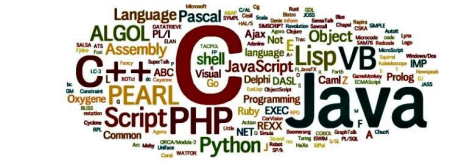
Sooner or later, you realize that being a developer isn’t about mastering a language — it’s about mastering an entire ecosystem.
a) Advanced Git
Git is not just add, commit, and push. It is the team’s time machine. Knowing how to use rebase, revert, cherry-pick, and how to resolve conflicts turns you into a careful craftsman of the project’s history.
b) Docker
Docker solves the classic “it works on my machine” by creating standardized environments.
It has already become a mandatory survival-kit item.
c) Others essential tools
● Postman --- API’s Tool for sending HTTP requests, organizing routes, testing authentication, and validating REST/GraphQL APIs. Documentação: https://learning.postman.com/
● Insomnia --- API’s A lightweight alternative to Postman, ideal for quickly testing routes and viewing JSON responses. Documentação: https://docs.insomnia.rest/
● Dbeaver --- data base visualizer Manager for exploring and administering relational databases such as PostgreSQL, MySQL, and Oracle. Documentação: https://dbeaver.com/docs/
● MongoDb Compass --- Explore MongoDB collections Official tool for visualizing documents, collections, and indexes in MongoDB. Documentação: https://www.mongodb.com/docs/compass/
● Jira --- tasks orchestration Agile management platform used to organize sprints, tasks, and backlog in large teams. Documentação: https://support.atlassian.com/jira-software/
● Notion --- personal organization and study Versatile app for creating notes, wikis, dashboards, and centralizing personal organization. Documentação: https://www.notion.so/help
● Discord --- communication for communities Widely used by study groups and tech teams for quick chats and thematic channels. Documentação: https://support.discord.com/hc/
● Figma --- frontend/UX alignment Design tool for reviewing prototypes, components, and styles before implementation. Documentação: https://help.figma.com/
And these are just a few examples among thousands.
5. Soft Skills: What No One Tells You
We can deepen this topic by highlighting the real impact of soft skills in the professional environment. Clear communication reduces rework. Knowing how to collaborate prevents conflicts and improves productivity. Receiving feedback without taking it personally greatly accelerates growth.
It is also worth mentioning the importance of critical thinking, empathy toward the team, responsibility with deadlines, and the willingness to help other developers.

Development is a human activity. This means social skills are just as important as technical ones.
Communication
Knowing how to ask is an art: • don’t send “it doesn’t work,” • explain what you tried, • show the error, • describe the expected behavior.
Receiving feedback
Feedback is not an attack. It is a tool. And the earlier you learn to receive it without pain, the faster you will grow.
Vulnerability
Saying “I don’t know” is liberating — and necessary.
6. Organization and Productivity Amid Chaos
This topic can include more detailed explanations on how to create sustainable routines. For beginners who study, work, and still have a personal life, organization is essential.
Adding practical examples such as task lists, ways of using Notion, progress tracking, ABC prioritization, and energy-management techniques can enrich the text. Explaining the difference between being busy and being productive helps build the right mindset.
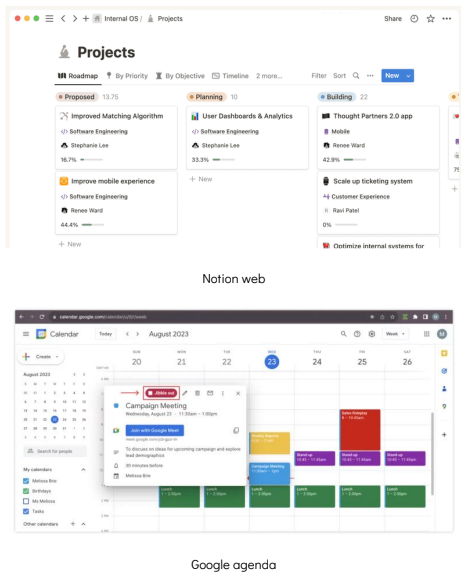
College + project + personal life = chaos. But a few habits save lives:
● Notion to organize everything. ● Pomodoro to maintain focus. ● Calendar to avoid overwhelming yourself. ● Checklists to avoid missing details.
Productivity is not doing more. It is doing what matters.
7. Common Mistakes Every Beginner Makes
Here we can add more details about each mistake and why it happens. Explain that trying to solve everything alone wastes time, that overly large PRs make reviews difficult, and that copying code without understanding it, harms learning.
We can also mention emotional mistakes, such as comparing yourself to highly experienced professionals or fearing to ask “basic” questions.
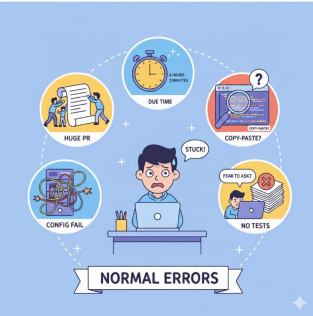
● spending 6 hours trying to solve something that someone could explain in 2 minutes; ● making PRs that are too large; ● copying code without understanding it; ● failing to configure the environment properly; ● ignoring tests; ● being afraid to ask questions. These mistakes are normal — and a natural part of growth.
8. Dealing With Bugs
Since we’re talking about the real life of programmers, we need to address the topic that keeps everyone awake at night: the infamous bugs.
Whether you’re a junior developer or a tired senior, they’re your shadow and always present in your daily work. It’s not a matter of whether you’ll encounter one, but when.
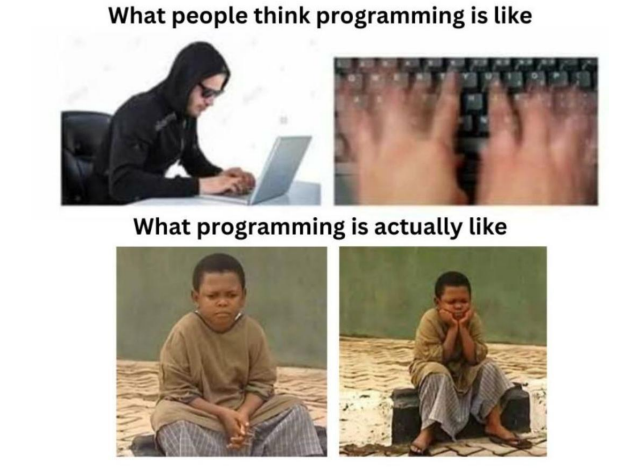
Although it is impossible to program while completely eliminating bugs, there are good practices and actions—often unknown to beginners—that drastically reduce their occurrence and the headaches they cause. Some of these best practices include:
● Implementing software tests: the presence of unit tests, integration tests, regression tests, and automated tests drastically reduces the occurrence of many bugs. ● Code review among team members ● Proper handling of exceptions or unexpected erros ● Adopting and using debugging and monitoring tools
In summary, bugs are inevitable, but the way you deal with them defines your professional maturity. Adopting good habits and best practices during software development transforms the hunt for an error from a moment of panic into an exercise in reasoning. Remember: every bug you fix is a practical lesson in how the system should not work, and that is valuable learning.
9. The Role of AI in Real-World Programming
We can expand this by explaining how AI has become an essential part of the modern development toolkit. Provide examples of useful prompts, explain how to use AI as a support tool, and reinforce the limits of its usage.
AI helps, but it does not replace deep understanding of the problem — and this needs to be clear.

AI is not a shortcut to skip learning, but it is a turbocharger for your process.
You can use AI to:
• understand legacy code; • review logic; • create tests; • write documentation; • perform refactoring.
But you cannot use AI to:
• replace real understanding; • copy solutions blindly; • ignore best practices.
10. Conclusion: Programming Is Not About Perfection
We can include more inspirational elements, explaining that a developer’s journey is continuous, full of learning, and that progress matters more than perfection. The conclusion can reinforce that no one starts knowing everything, and the beginner’s goal is to build confidence, not hold themselves to the standards of a specialist.
In the end, entering a large project doesn’t just transform you as a developer — it transforms you as a person.
The journey is full of stumbles, but also full of achievements. And with every bug fixed, every PR approved, and every day survived, you get closer to the best professional version of yourself.
And remember: no one is born a senior. Everyone starts as a junior, lost, stumbling... and growing.
You don’t need to know everything.
You just need to start.