

The TL;DR is right below, but it is worth reading carefully if you are responsible for or influence technical decisions in .NET.
Design patterns in .NET are almost like a language of their own within the platform. In ASP.NET Core, Entity Framework, third-party libraries, and even your own code, the same patterns keep appearing: factory, builder, decorator, strategy, repository, and so on.
This article is a practical guide for technical leaders and experienced developers who want to deeply understand how .NET design patterns emerge in everyday work. Rather than simply “applying pattern X,” the focus here is on recognizing these patterns in the framework and using that knowledge to make better decisions about architecture, code reviews, and integration in legacy codebases.
We will cover:
- The problem each pattern solves.
- Where it appears in .NET / ASP.NET Core.
- When it does or does not make sense to use it in your own code.
- Real trade-offs, without book slogans.
TL;DR
For those in a hurry:
- .NET and ASP.NET Core already have most of the classic GoF patterns built in: Factory, Builder, Singleton (through DI), Adapter, Decorator, Facade, Observer, Strategy, Command, Template Method, Repository, and Unit of Work.
- Instead of “forcing a pattern” into your code, the greatest benefit comes from recognizing the patterns that are already there, understanding the problems they solve, and using them as shared vocabulary across the team.
- For technical leaders, this affects:
- Architecture: knowing where to use DI, where to encapsulate integrations, and where to apply CQRS.
- Code review: challenging decisions based on real problems (coupling, testability, clarity) instead of “you forgot to use pattern X.”
- Onboarding: explaining legacy code by saying “this is a logging Decorator” or “this is an Adapter for the payment gateway,” rather than “this huge class does a bunch of things.”
- Watch out for overengineering: using too many patterns, too early, can make code more confusing than necessary.
If you want more detail, continue with section 1.
1. Why design patterns matter so much in .NET today
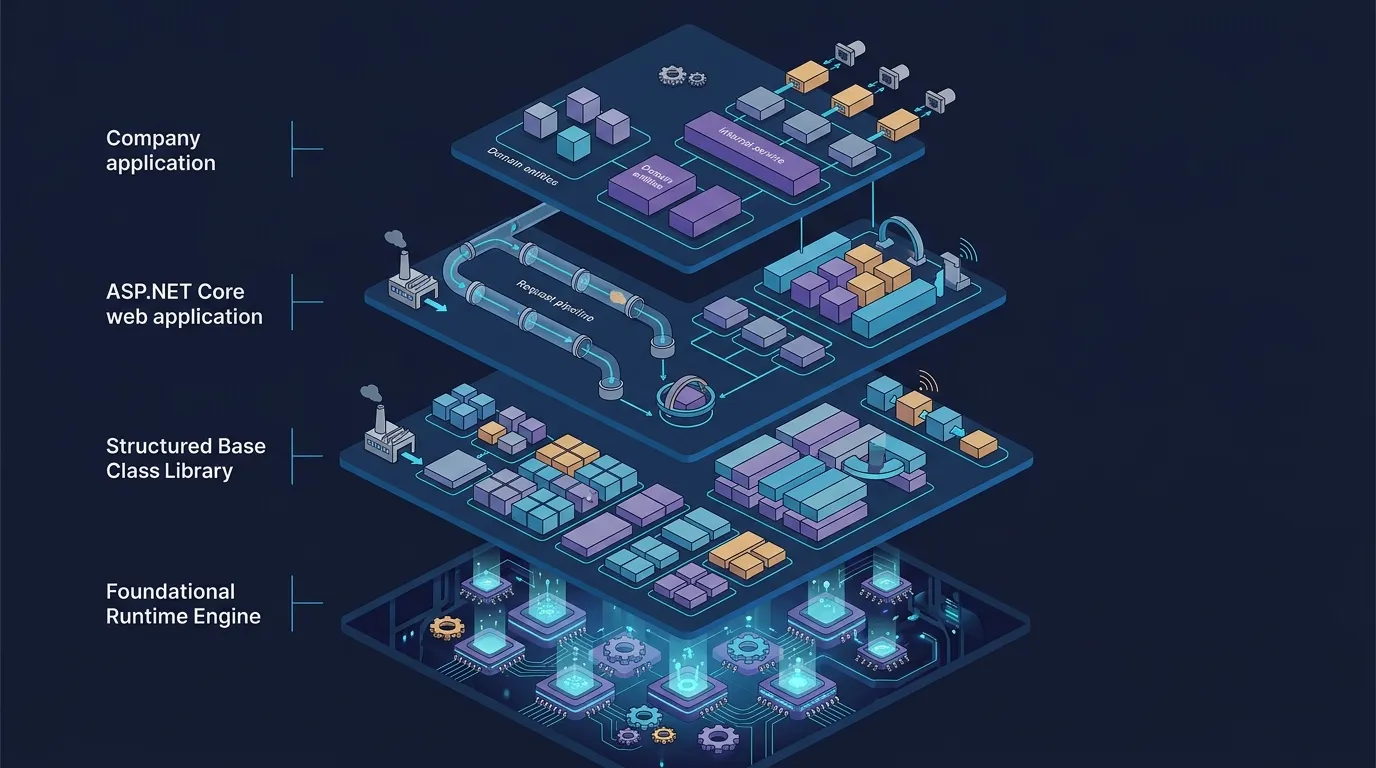
In an extensive ecosystem such as .NET, you are rarely dealing only with “your code.” Any reasonably sized application includes:
- The runtime (CLR).
- The BCL (base class library).
- ASP.NET Core, ORMs, NuGet libraries, and third-party SDKs.
- Your company’s code, with its layers, domains, and integrations.
All these pieces are built using common design patterns, which makes .NET design patterns a shared vocabulary:
- “This middleware is a Decorator.”
- “This interface is a serialization Strategy.”
- “This
DbContextacts as a Unit of Work + Repository.”
When everyone understands this vocabulary, design discussions become much more objective.
Using a pattern vs. recognizing patterns in the framework
There is a significant difference between:
- “I am going to apply pattern X here”
(sometimes forcing a pattern where anifwould have been enough).
and:
- “This framework method implements a Template Method”
(and you only need to plug into a hook).
This article focuses on the second approach: reading and designing .NET/C# code while recognizing the patterns that already exist, and only then deciding whether reproducing that style in your own code is worthwhile.
If you want to reinforce .NET fundamentals at the same time, a useful complement is reviewing C# and .NET coding best practices in resources such as this article about .NET and C# best practices.
How this helps technical leaders
For tech leads, architects, and technical references, understanding .NET design patterns changes how you approach:
- Architecture decisions
- Is it worth isolating this payment gateway with an Adapter?
- Is this cross-cutting concern (logging/retry/cache) better handled with a Decorator or middleware?
-
Will headless CQRS help, or is a simple Command Handler enough?
-
More objective code reviews
Instead of “I like it/I do not like it,” you can discuss: - “Your
UserServiceis becoming a God Object; perhaps its role here is a Facade over repositories and integrations.” -
“You created a manual Singleton with
static, but DI is already available. Why not let the container handle it?” -
Onboarding in legacy codebases
Explaining “here we have a domain-event Observer; over there we have a pricing Strategy” is much more effective than saying “there is some magic here that calls this and that.”
[TRADE-OFF] Overengineering: when patterns help vs. complicate things
Patterns are tools, not goals. Common problems include:
- Applying a pattern too early: “What if we need five more strategies someday?” → today you have one strategy and seven interfaces to maintain.
- Patterns in cascades: every layer uses three different patterns, and the flow becomes a maze of factories, facades, and decorators.
A practical rule:
Start simple. Use patterns when the problem becomes clear (behavioral variation, multiple integrations, cross-cutting responsibilities, and so on). Before that, straightforward code is usually better.
2. Creational patterns in .NET: more than new
2.1 Factory Method and Abstract Factory in everyday C
Creational patterns answer the question: “How can I instantiate this without coupling everyone to new and configuration details?”
ASP.NET Core Options: configuration factories
The Options pattern in ASP.NET Core is a great example of a configuration-driven “object factory.”
csharp public class MyOptions { public string Endpoint { get; set; } = ""; public int TimeoutSeconds { get; set; } = 30; }
// Program.cs / Startup.cs builder.Services.Configure<MyOptions>(builder.Configuration.GetSection("MyService"));
// In any service: public class MyService { private readonly HttpClient _client;
public MyService(HttpClient client, IOptions<MyOptions> options)
{
    _client = client;
    _client.BaseAddress = new Uri(options.Value.Endpoint);
    _client.Timeout = TimeSpan.FromSeconds(options.Value.TimeoutSeconds);
}
}
IOptions<MyOptions> works as a kind of configurable Factory Method:
- You do not instantiate
MyOptionsdirectly. - The container knows how to build the instance (from configuration).
- When you change the binding, you do not need to rewrite the code that consumes
MyOptions.
With IOptionsMonitor<>, you get a “reactive factory”: whenever the configuration changes, the “product” changes on the next access.
DbProviderFactory and Abstract Factory
ADO.NET provides a classic example of an Abstract Factory through DbProviderFactory:
csharp DbProviderFactory factory = DbProviderFactories.GetFactory("System.Data.SqlClient");
using var connection = factory.CreateConnection(); connection.ConnectionString = connectionString;
using var command = factory.CreateCommand(); command.Connection = connection; command.CommandText = "SELECT * FROM Users";
Here, DbProviderFactory is an abstract factory that knows how to create a family of related objects:
DbConnection,DbCommand,DbDataAdapter, and so on.- The concrete implementation (SQL Server, MySQL, and so on) remains hidden behind the factory.
When to create your own factories
You rarely need a “formal” Abstract Factory in an application, but the pattern is useful when:
- You have bounded contexts that change the “type” of their dependencies:
- For example, in the Payments vertical, each method (credit card, bank slip, PIX) needs different clients and configuration.
- You need integration plug-ins:
- Payment gateways, fraud-prevention providers, and email/SMS services from different vendors.
A simple outline:
csharp public interface IPaymentGateway { Task<PaymentResult> ChargeAsync(PaymentRequest request); }
public interface IPaymentGatewayFactory { IPaymentGateway Create(string method); }
public class PaymentGatewayFactory : IPaymentGatewayFactory { private readonly IServiceProvider _provider;
public PaymentGatewayFactory(IServiceProvider provider)
{
    _provider = provider;
}

public IPaymentGateway Create(string method)
{
    return method switch
    {
        "credit-card" => _provider.GetRequiredService<CreditCardGateway>(),
        "pix"         => _provider.GetRequiredService<PixGateway>(),
        _             => throw new NotSupportedException($"Payment method {method} not supported")
    };
}
}
[PITFALL] Factories that become God Objects
A classic danger:
- The factory starts out merely choosing which implementation to use.
- Gradually, it begins to:
- Validate input.
- Perform logging.
- Call integrations.
- Publish events.
Before long, the “factory” has become a large service, mixing object creation with business rules. This is a sign that responsibilities should be separated:
- One small class to choose/create (the actual factory).
- Other classes for business rules and orchestration.
2.2 Builder: reading and writing fluent C# code
Most fluent APIs in C# are variations of the Builder pattern: you compose calls that accumulate state until something is “completed” or configured.
Examples: HttpClient, IServiceCollection, IApplicationBuilder
ASP.NET Core is built around Builders from beginning to end:
csharp var builder = WebApplication.CreateBuilder(args);
builder.Services .AddControllers() .AddJsonOptions(o => { o.JsonSerializerOptions.PropertyNamingPolicy = null; });
builder.Services.AddHttpClient("GitHub", client => { client.BaseAddress = new Uri("https://api.github.com/"); client.DefaultRequestHeaders.UserAgent.ParseAdd("MyApp"); });
var app = builder.Build();
app.UseRouting(); app.UseAuthentication(); app.UseAuthorization();
app.MapControllers();
app.Run();
Here:
WebApplicationBuilderis an application Builder.- The
app.UseXxx()pipeline is a middleware Builder. IServiceCollectionbuilds the dependency graph through a fluent API.
This is useful for technical leaders because:
- Internal APIs used by multiple squads can follow the same style:
services.AddBusinessModuleX();builder.AddTenantSupport().AddMultiRegion();- A Builder avoids large constructors with ten optional parameters; instead, you get a step-by-step configuration API.
[TRADE-OFF] Builder vs. multiple constructors vs. request objects
- Multiple constructors:
- Good for simple types with few variations.
-
Become unwieldy when there are many combinations of optional parameters.
-
Request object:
- Works well when there is a clear “command.”
-
Can become a bag of properties without a clear expression if you are not careful.
-
Builder:
- Shines when:
- There are many configurable parameters.
- You want an expressive API that reflects the configuration flow.
- Cost:
- More types and glue code.
- It can hide implicit dependencies (for example, call order may matter).
A pragmatic rule:
If consuming your type is becoming confusing (“which constructor should I use again?”), consider a Builder or fluent API.
2.3 Properly implemented—and poorly implemented—Singletons in modern .NET
In modern .NET, you should rarely implement the classic Singleton with static. You almost always want the DI container to manage the lifetime.
ASP.NET Core singleton service vs. the classic pattern
csharp builder.Services.AddSingleton<ISystemClock, SystemClock>();
Here:
ISystemClockhas one instance per container (usually, per application).- Anyone who needs it requests it through the constructor; you do not need a static
GetInstance().
This provides:
- Concurrency control (thread safety managed by the container).
- Testability (you can replace the implementation in the DI configuration).
- Initialization-order management (the container controls it).
[PITFALL] Creating a manual Singleton with static
csharp public class ConfigManager { private static readonly ConfigManager _instance = new(); public static ConfigManager Instance => _instance;
private ConfigManager() { /* load configuration */ }

public string GetValue(string key) { ... }
}
Problems:
- Makes testing harder (you cannot replace
ConfigManager). - Embeds global dependencies (hidden coupling).
- Can create initialization-order problems when complex
staticmembers are involved.
In most cases, prefer:
csharp public interface IConfigManager { string GetValue(string key); }
public class ConfigManager : IConfigManager { // ... }
// Program.cs builder.Services.AddSingleton<IConfigManager, ConfigManager>();
Acceptable uses of singletons
Good uses of the singleton lifetime through DI include:
- Immutable configuration: option types loaded once.
- Shared clients:
HttpClientthroughIHttpClientFactory.- Queue clients, caches, and other expensive resources.
3. Structural patterns found throughout .NET code
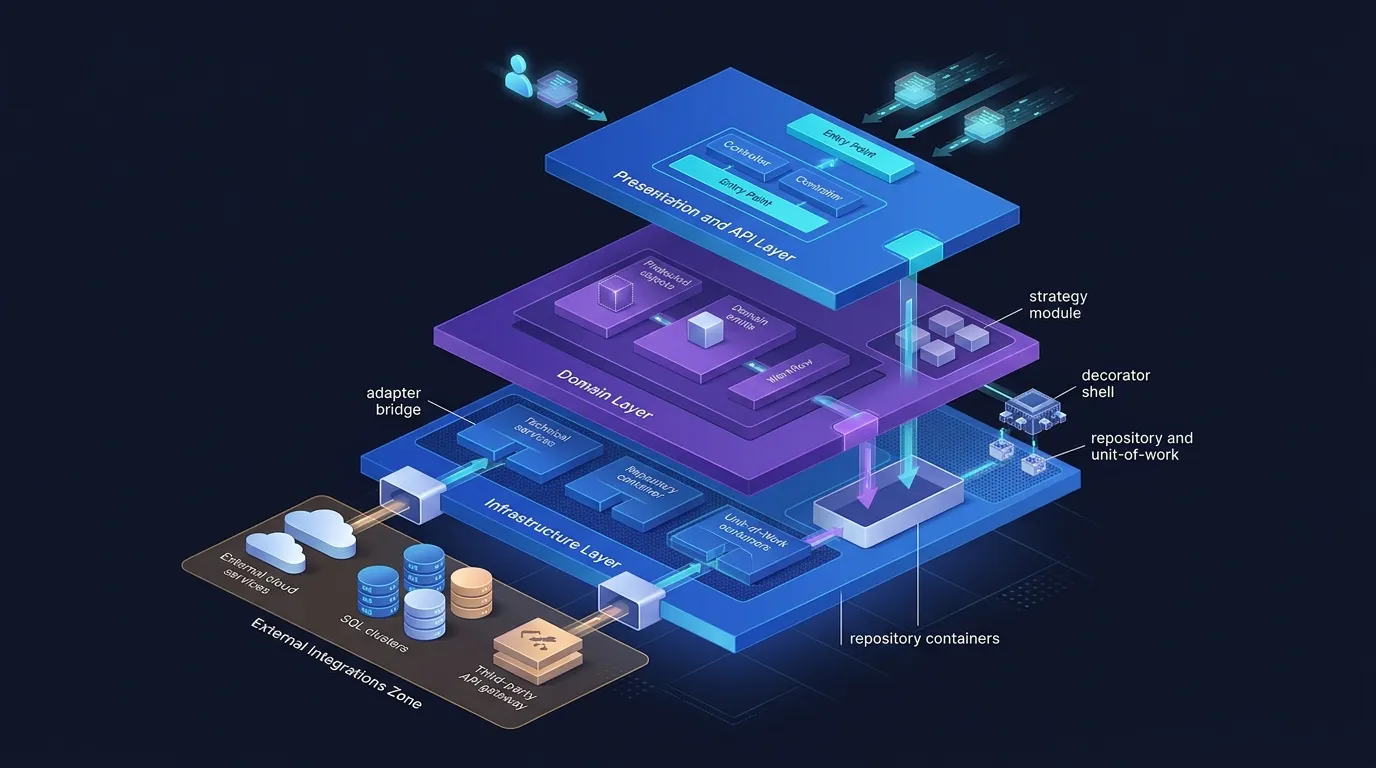
3.1 Adapter: making APIs compatible in integrations
Adapter is the pattern for “talking to the outside world without polluting your domain.” You expose an interface that makes sense for your application and adapt the external SDK to that interface.
BCL example: Stream and wrappers
Stream is an abstraction. Implementations such as CryptoStream and GZipStream adapt a base stream to add behavior:
csharp using var file = File.OpenRead("data.txt"); using var gzip = new GZipStream(file, CompressionMode.Decompress); using var reader = new StreamReader(gzip);
string content = reader.ReadToEnd();
GZipStreamadapts aStreamto handle compression.- The public API is still “a
Stream.”
Typical integrations: vendor SDKs
With DDD / Ports & Adapters, you:
- Define a port (interface) aligned with the domain.
- Create Adapters for each vendor.
csharp public interface IPaymentProvider { Task<PaymentResult> ChargeAsync(PaymentRequest request); }
public class AcmePaymentAdapter : IPaymentProvider { private readonly AcmeSdkClient _client;
public AcmePaymentAdapter(AcmeSdkClient client)
{
    _client = client;
}

public async Task<PaymentResult> ChargeAsync(PaymentRequest request)
{
    var acmeRequest = new AcmeChargeRequest
    {
        Amount = request.Amount,
        CardToken = request.CardToken
    };

    var response = await _client.ChargeAsync(acmeRequest);

    return new PaymentResult
    {
        Success = response.Status == "OK",
        TransactionId = response.Id
    };
}
}
[PITFALL] Bringing vendor types into the domain
A common mistake:
- SDK models (
AcmeChargeRequest,AcmeChargeResponse) appear in the domain, entities, and business services.
Consequences:
- The domain becomes coupled to a specific vendor.
- Switching vendors becomes major surgery.
Rule: external SDKs do not enter the domain. Use an Adapter as a containment zone.
3.2 Decorator: middleware, pipelines, and cross-cutting concerns

Decorator is the pattern of “wrapping” a service with another service to add behavior.
ASP.NET Core middleware as a Decorator chain
The app.UseXxx() pipeline is literally a chain of Decorators:
csharp app.Use(async (context, next) => { // Before await next(); // After });
Each middleware:
- Receives a
RequestDelegate(next). - Does something before or after calling the next component.
This is a pure Decorator: an object that follows the same “signature” and adds behavior around another object.
DelegatingHandler in HttpClient
Another direct example:
csharp public class LoggingHandler : DelegatingHandler { protected override async Task<HttpResponseMessage> SendAsync( HttpRequestMessage request, CancellationToken ct) { Console.WriteLine($"Request: {request.Method} {request.RequestUri}");
    var response = await base.SendAsync(request, ct);

    Console.WriteLine($"Response: {response.StatusCode}");

    return response;
}
}
You can chain several DelegatingHandler instances through IHttpClientFactory, forming a Decorator pipeline.
[EXAMPLE] Decorating a domain service with logging
csharp public interface IOrderService { Task<Order> GetByIdAsync(Guid id); }
public class OrderService : IOrderService { public Task<Order> GetByIdAsync(Guid id) { // Query the repository, apply business rules, and so on. } }
public class LoggingOrderServiceDecorator : IOrderService { private readonly IOrderService _inner; private readonly ILogger<LoggingOrderServiceDecorator> _logger;
public LoggingOrderServiceDecorator(
    IOrderService inner,
    ILogger<LoggingOrderServiceDecorator> logger)
{
    _inner = inner;
    _logger = logger;
}

public async Task<Order> GetByIdAsync(Guid id)
{
    _logger.LogInformation("Fetching order {OrderId}", id);
    var order = await _inner.GetByIdAsync(id);
    _logger.LogInformation("Fetched order {OrderId}", id);
    return order;
}
}
In containers that support Decorators, you can register something like:
csharp builder.Services.AddScoped<IOrderService, OrderService>(); // builder.Services.Decorate<IOrderService, LoggingOrderServiceDecorator>();
[TRADE-OFF] Decorator vs. AOP vs. filters
- Decorator:
- Works well when you control DI and the contracts.
-
Transparent and explicit (you can see the decorators during composition).
-
AOP (Aspect-Oriented Programming):
- Can be powerful for cross-cutting concerns (logging, auditing, retries).
-
Is often “magical” and difficult to trace while debugging.
-
MVC filters / pipeline filters:
- Good for HTTP-related concerns (authorization, validation, response formatting).
- Less appropriate for purely domain-oriented logic.
A pragmatic rule:
If the cross-cutting concern is about HTTP requests, use middleware/filters.
If it is about domain services, prefer a Decorator.
3.3 Facade: stabilizing boundaries between contexts
Facade is the pattern of a simple entry point into a complex subsystem.
“Services” and “Managers” as Facades
Not every UserService is an anti-pattern. Some genuinely:
- Orchestrate multiple repositories.
- Call integrations.
- Coordinate transactions.
Example:
csharp public class CheckoutFacade { private readonly ICartRepository _cartRepository; private readonly IPaymentProvider _paymentProvider; private readonly IOrderRepository _orderRepository;
public CheckoutFacade(
    ICartRepository cartRepository,
    IPaymentProvider paymentProvider,
    IOrderRepository orderRepository)
{
    _cartRepository = cartRepository;
    _paymentProvider = paymentProvider;
    _orderRepository = orderRepository;
}

public async Task<CheckoutResult> CheckoutAsync(Guid cartId)
{
    var cart = await _cartRepository.GetByIdAsync(cartId);

    var paymentResult = await _paymentProvider.ChargeAsync(new PaymentRequest
    {
        Amount = cart.Total
    });

    if (!paymentResult.Success)
        return CheckoutResult.Failed("Payment failed");

    var order = Order.CreateFromCart(cart, paymentResult.TransactionId);

    await _orderRepository.SaveAsync(order);

    return CheckoutResult.Success(order.Id);
}
}
The web application talks only to the Facade and does not need to know all the internal details.
System.IO.File as a Facade
System.IO.File encapsulates several I/O APIs:
csharp var text = File.ReadAllText("file.txt"); File.WriteAllText("file.txt", "content");
It is a Facade over:
- Streams.
- Buffers.
- File-system access.
[PITFALL] A large service that is not a Facade, but a lack of design
Warning signs:
UserServicewith thousands of lines.- Unrelated methods:
CreateUser,ExportToCsv,SendWelcomeEmail,RebuildIndexes… - A mixture of:
- Business rules.
- Infrastructure.
- UI details.
In these cases:
- Break it into:
- Smaller Facades by use case (for example,
UserRegistrationFacade). - Focused domain services.
- Adapters for integrations.
4. Behavioral patterns in .NET: events, commands, and pipelines
4.1 Observer and the .NET event model
Observer is the pattern in which “when one thing changes, several observers are notified.”
Events (event, EventHandler)
csharp public class Stock { private int _quantity; public event EventHandler<int>? QuantityChanged;
public void Change(int value)
{
    _quantity += value;
    QuantityChanged?.Invoke(this, _quantity);
}
}
Anyone interested in the event subscribes:
csharp var stock = new Stock(); stock.QuantityChanged += (sender, newQuantity) => { Console.WriteLine($"New quantity: {newQuantity}"); };
This is a classic Observer: Stock is the Subject, and listeners are the Observers.
INotifyPropertyChanged in WPF/MAUI
In .NET UIs, INotifyPropertyChanged is a standardized implementation of Observer:
csharp public class PersonViewModel : INotifyPropertyChanged { private string _name = "";
public string Name
{
    get => _name;
    set
    {
        if (_name == value) return;
        _name = value;
        PropertyChanged?.Invoke(this, new PropertyChangedEventArgs(nameof(Name)));
    }
}

public event PropertyChangedEventHandler? PropertyChanged;
}
The UI observes the ViewModel and updates the screen when properties change.
[PITFALL] Memory leaks caused by events
With delegate-based events:
- If an “observer” subscribes to a long-lived object and does not unsubscribe, the GC cannot collect the observer, causing a leak.
Rule: for long-lived objects (singletons, global services), always plan the unsubscribe operation.
Events vs. asynchronous messages
- .NET events (Observer):
- In memory and synchronous by default.
-
Good for local coordination within a process.
-
Asynchronous messages (queue, bus):
- Cross-process and resilient to failures.
- Good for integrations between services and long-running workflows.
Trade-off:
If the reaction to the event is local and quick, use Observer.
If it is between services or must survive process failures, use messaging.
4.2 Strategy: configuring behavior through DI
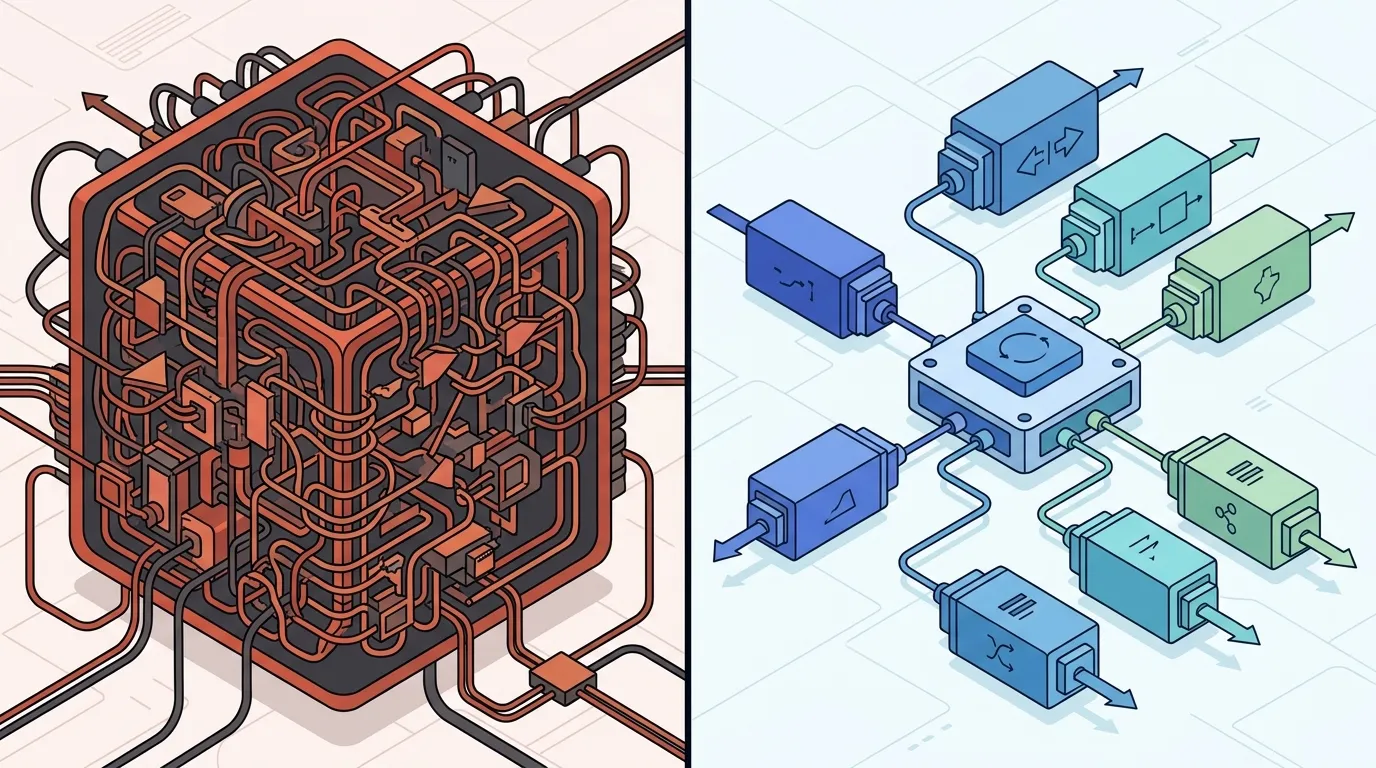
Strategy is the pattern of “swapping an algorithm through composition.”
Injected interfaces and policies
ASP.NET Core uses Strategy in several places:
IPasswordHasher<>in Identity.IOutputFormatterin MVC.- Different forms of caching, encryption, serialization, and so on.
Simplified example:
csharp public interface IPriceStrategy { decimal Calculate(decimal basePrice); }
public class DefaultPriceStrategy : IPriceStrategy { public decimal Calculate(decimal basePrice) => basePrice; }
public class BlackFridayPriceStrategy : IPriceStrategy { public decimal Calculate(decimal basePrice) => basePrice * 0.7m; }
public class PricingService { private readonly IPriceStrategy _strategy;
public PricingService(IPriceStrategy strategy)
{
    _strategy = strategy;
}

public decimal GetFinalPrice(decimal basePrice)
    => _strategy.Calculate(basePrice);
}
Registration:
csharp builder.Services.AddScoped<IPriceStrategy, DefaultPriceStrategy>(); // In another environment or scenario, replace it with BlackFridayPriceStrategy.
Switching behavior through configuration
You can choose a Strategy based on:
- Feature flags.
- Region/tenant.
- Customer type.
csharp public class TenantPriceStrategySelector : IPriceStrategy { private readonly IHttpContextAccessor _httpContextAccessor; private readonly IPriceStrategy _default; private readonly IPriceStrategy _premium;
public TenantPriceStrategySelector(
    IHttpContextAccessor httpContextAccessor,
    DefaultPriceStrategy @default,
    PremiumPriceStrategy premium)
{
    _httpContextAccessor = httpContextAccessor;
    _default = @default;
    _premium = premium;
}

public decimal Calculate(decimal basePrice)
{
    var tenant = _httpContextAccessor.HttpContext?.Request.Headers["X-Tenant"];

    return tenant == "premium"
        ? _premium.Calculate(basePrice)
        : _default.Calculate(basePrice);
}
}
[TRADE-OFF] Strategy vs. extensive if-else statements
- Few variations + little coupling: a direct
switchis enough and simpler. - When rules grow, spread across the codebase, and every new variation requires changes in multiple
if/elseblocks, it is time for Strategy.
[PITFALL] Too many Strategies
A sign of overdesign:
- You create a Strategy for everything:
ILoggingStrategy,ISaveStrategy,IEmailStrategy…- The business flow becomes fragmented across dozens of classes.
Use Strategy when there is real behavioral variation that you want to swap without rewriting the client.
4.3 Command, CQRS, and pipelines in .NET
Command is the pattern of representing an intention as an object.
Commands as intention objects
csharp public record CreateOrderCommand(Guid CustomerId, IReadOnlyList<Guid> Items);
public interface ICommandHandler<TCommand> { Task HandleAsync(TCommand command, CancellationToken cancellationToken = default); }
public class CreateOrderCommandHandler : ICommandHandler<CreateOrderCommand> { public Task HandleAsync(CreateOrderCommand command, CancellationToken cancellationToken = default) { // Create the order, save it to a repository, and so on. } }
You gain:
- Clear separation between intention (“create order”) and execution.
- A single place for validation, authorization, and processing.
Command pattern in workers and queues
You find Command in:
- UI APIs (buttons triggering commands).
- Work queues: each job is a “command” to be executed by a worker.
csharp public class ProcessOrdersBackgroundService : BackgroundService { protected override async Task ExecuteAsync(CancellationToken stoppingToken) { while (!stoppingToken.IsCancellationRequested) { var command = await DequeueAsync(stoppingToken); await HandleCommandAsync(command, stoppingToken); } }
private Task<CreateOrderCommand> DequeueAsync(CancellationToken ct)
{
    // Read from the queue, deserialize, and so on.
}

private Task HandleCommandAsync(CreateOrderCommand command, CancellationToken ct)
{
    // Delegate to ICommandHandler<CreateOrderCommand>.
}
}
Each queue message is a Command.
CQRS for highly complex scenarios
CQRS (Command and Query Responsibility Segregation) is a natural evolution:
- Commands: change state and do not return complex data.
- Queries: only read and have no side effects.
You can implement it lightly:
csharp public interface IQuery<TResult> { }
public interface IQueryHandler<TQuery, TResult> where TQuery : IQuery<TResult> { Task<TResult> HandleAsync(TQuery query, CancellationToken cancellationToken = default); }
[TRADE-OFF] Full CQRS vs. “common-sense CQRS”
- Full CQRS (with event sourcing, separate read models, and so on) makes sense when:
- You have high read/write complexity.
-
There are strong requirements for auditing, history, and state reconstruction.
-
Common-sense CQRS:
- Separate command and query handlers.
- Avoid methods that do everything (read + write + side effects) at the same time.
Rule:
Start with lightweight CQRS (separate commands and queries).
Adopt event sourcing and separate models only when the problem justifies them, not because “the book says so.”
5. Patterns specific to the .NET ecosystem (implicit, but real)
5.1 Dependency Injection as a first-class pattern
DI, as a pattern, is central to ASP.NET Core.
DI container and IServiceProvider as a “hidden” Service Locator
csharp var builder = WebApplication.CreateBuilder(args);
builder.Services.AddScoped<IUserRepository, UserRepository>(); builder.Services.AddScoped<IUserService, UserService>();
var app = builder.Build();
- The Composition Root is
Program.cs: that is where you define the object graph. - The framework injects what controllers, services, and handlers need through their constructors.
IServiceProvider is technically a Service Locator. However:
- It is confined to the runtime.
- In most cases, you do not need to call it directly.
[PITFALL] Scattering IServiceProvider.GetService throughout the code
csharp public class SomeClass { private readonly IServiceProvider _provider;
public SomeClass(IServiceProvider provider)
{
    _provider = provider;
}

public void DoSomething()
{
    var repo = _provider.GetService<IUserRepository>();
    // ...
}
}
This becomes:
- An explicit Service Locator.
- Hidden dependencies (no one knows that
SomeClassneedsIUserRepository). - Harder-to-test code.
Rule: prefer constructor injection; use IServiceProvider directly only in very specific places (factories, integration with legacy APIs, and so on).
[TRADE-OFF] Minimal DI vs. feature-rich DI frameworks
- ASP.NET Core’s minimal DI:
- Covers most use cases without adding complexity.
-
Does not have every feature (automatic scanning, advanced child containers, and so on).
-
More complex DI frameworks:
- May provide useful features (automatic scanning, decorators, interception).
- Add configuration and debugging complexity.
As a technical leader, always consider the cost-benefit ratio:
- Does the team understand the extra features?
- Does the actual benefit justify the learning curve and maintenance cost?
5.2 Template Method in inheritance-based frameworks
Template Method is the pattern in which a base class controls the flow while subclasses fill in the details.
Controllers, handlers, and UI frameworks
You see Template Method in:
- MVC controllers:
- The framework controls the request pipeline; you implement actions and, sometimes, methods such as
OnActionExecutingandOnActionExecuted. - Handlers:
- Methods such as
ExecuteAsyncandHandleAsynccalled by the infrastructure. - UI (WPF, MAUI):
- Methods such as
OnLoad,OnAppearing, andOnInitialized.
Pseudocode:
csharp public abstract class BackgroundJob { public async Task RunAsync() { await BeforeRunAsync(); await ExecuteAsync(); await AfterRunAsync(); }
protected virtual Task BeforeRunAsync() => Task.CompletedTask;
protected abstract Task ExecuteAsync();
protected virtual Task AfterRunAsync() => Task.CompletedTask;
}
The “template” (RunAsync) is fixed; subclasses only implement the “hooks.”
[TRADE-OFF] Template Method vs. Strategy through composition
- Template Method:
- Simple to understand (inheritance and overrides).
-
But ties you to the hierarchy: you can inherit from only one base class.
-
Strategy + composition:
- More flexible (you can combine different strategies).
- More types and indirection.
An opinionated rule:
If the framework already dictates the flow and provides hooks, use Template Method without hesitation.
If you are designing something new and want to compose behaviors freely, prefer Strategy through DI.
5.3 Repository, Unit of Work, and the “worst and best” of DDD in C
Repository and Unit of Work are ubiquitous in .NET, especially through ORMs.
ORMs combining Repository + Unit of Work
A typical DbContext acts as:
- Unit of Work:
- Tracks changes.
-
Calls
SaveChanges()in batches. -
Generic Repository:
- Exposes collections (
DbSet<T>) for CRUD operations.
csharp public class OrdersController : ControllerBase { private readonly AppDbContext _db;
public OrdersController(AppDbContext db)
{
    _db = db;
}

[HttpPost]
public async Task<IActionResult> Create([FromBody] CreateOrderDto dto)
{
    var order = new Order(...);

    _db.Orders.Add(order);
    await _db.SaveChangesAsync();

    return CreatedAtAction(nameof(GetById), new { id = order.Id }, order);
}
}
In simple scenarios, this is enough.
When explicit repositories make sense
Create explicit repositories when you want to:
- Protect the domain from persistence details.
- Express high-level queries aligned with the business.
csharp public interface IOrderRepository { Task<Order?> GetByIdAsync(Guid id); Task<IReadOnlyList<Order>> GetPendingOrdersAsync(); Task AddAsync(Order order); Task SaveChangesAsync(); }
Internally, you use DbContext, but the domain knows only the interface.
[PITFALL] An anemic repository that only forwards calls
csharp public class OrderRepository : IOrderRepository { private readonly AppDbContext _db;
public Task<Order?> GetByIdAsync(Guid id)
    => _db.Orders.FindAsync(id).AsTask();
}
If the repository only delegates calls, without adding anything:
- You gain very little beyond extra code.
- The complexity is not justified.
Ideally, repositories add:
- Specific queries.
- Domain semantics (“overdue orders,” “pending orders”).
- Encapsulation of mapping details.
Opinionated guidance for technical leaders
- In simple contexts, using
DbContextdirectly in handlers/controllers is acceptable and practical. - In complex domains:
- Use explicit repositories for clarity and testability.
- Keep
DbContextas an infrastructure detail. - Avoid ceremonial DDD: extra layers without a clear benefit only get in the team’s way.
6. How to lead teams toward mature use of .NET design patterns
From the “pattern name” to the “problem it solves”
Patterns are conversation shortcuts, not medals. Instead of:
- “Let’s use Decorator here because it is cool.”
Prefer:
- “We have multiple cross-cutting concerns in this service (logging, retries, and caching). Decorator helps us compose them concisely.”
A useful heuristic is to map:
- Problem → possible patterns.
Quick examples:
- Many behavioral variations → Strategy.
- Cross-cutting concerns around a service → Decorator / middleware.
- Integration with an external vendor → Adapter + Facade.
- Configuration or instantiation complexity → Builder / Factory.
- Flow controlled by the framework → Template Method.
Practices for tech leads
Code reviews focused on clarity of intent
During code review, instead of saying “you forgot to use pattern X,” bring the discussion back to the problem:
- “We currently have five different
if/elseblocks for calculating prices. What about isolating this in a configurable Strategy?” - “Is this
UserServiceorchestrating subsystems (Facade), or is it simply accumulating responsibilities?”
Direct questions help:
- “What is difficult to test here?”
- “What becomes easier to change if we isolate it in a pattern?”
Design sessions that compare alternatives
Before committing to a pattern, put these options on the table:
- A solution without a dedicated pattern (an if/else, a simple method).
- One or two candidate patterns.
- The impact on:
- Reading complexity.
- Testing.
- Real extensibility (not hypothetical extensibility).
This shifts the discussion toward “what problem are we solving?” instead of “which pattern looks best?”
[TRADE-OFF] Over-standardizing vs. allowing guided variation
Strict guidelines such as:
- “Always use Repository, even for a simple CRUD screen.”
- “Every business rule must be in a Strategy.”
Tend to create ceremonial architectures.
A better approach:
- Lightweight guidelines, with clear reasons:
- “We use Adapter for every external integration exposed to the domain.”
- “Decorators are the standard for domain cross-cutting concerns (logging, retries, and caching).”
- Leave room for well-justified exceptions.
How to train your eye to recognize patterns
- In legacy .NET code:
- Ask developers to identify: “Where is there a Strategy? Where is there a Template Method? Where is there a disguised Singleton?”
-
Use this as a starting point for refactoring, not as a witch hunt.
-
In frameworks and SDKs:
- When reading ASP.NET Core documentation, try to answer:
- “What pattern is behind this middleware?”
- “Is this configuration API a Builder?”
Over time, the team starts using “Decorator,” “Adapter,” and “Strategy” with concrete meaning, rather than merely as book terms.
Next steps
If you made it this far, you probably have enough foundation to:
- Choose one or two patterns to “see” in existing code
-
Open an ASP.NET Core project and mark:
- Where there is a Decorator (middleware, handlers,
DelegatingHandler). - Where there is a Template Method (controllers, background services).
- Where there is a Decorator (middleware, handlers,
-
Select one real case from your team and consciously apply a pattern
-
For example, extract a Strategy from a method full of
ifstatements, or create an Adapter to isolate an SDK. -
Reinforce .NET best-practice fundamentals
-
Review a reference resource such as the article about .NET and C# best practices and connect those practices to the patterns discussed here.
-
Bring the topic to the team
- Propose a code-reading session in which everyone identifies patterns in part of the solution.
-
Discuss whether each pattern is helping or merely making the flow more obscure.
-
Connect with people who work with this every day
- Join the SCCB community — https://instagram.com/software_craftsmanship
- See upcoming events — https://instagram.com/software_craftsmanship