
Every GCP project starts clean and, six months later, can become a pile of resources no one knows the origin of or who is paying for. A handful of decisions made early can prevent that.

Organize your house before you scale
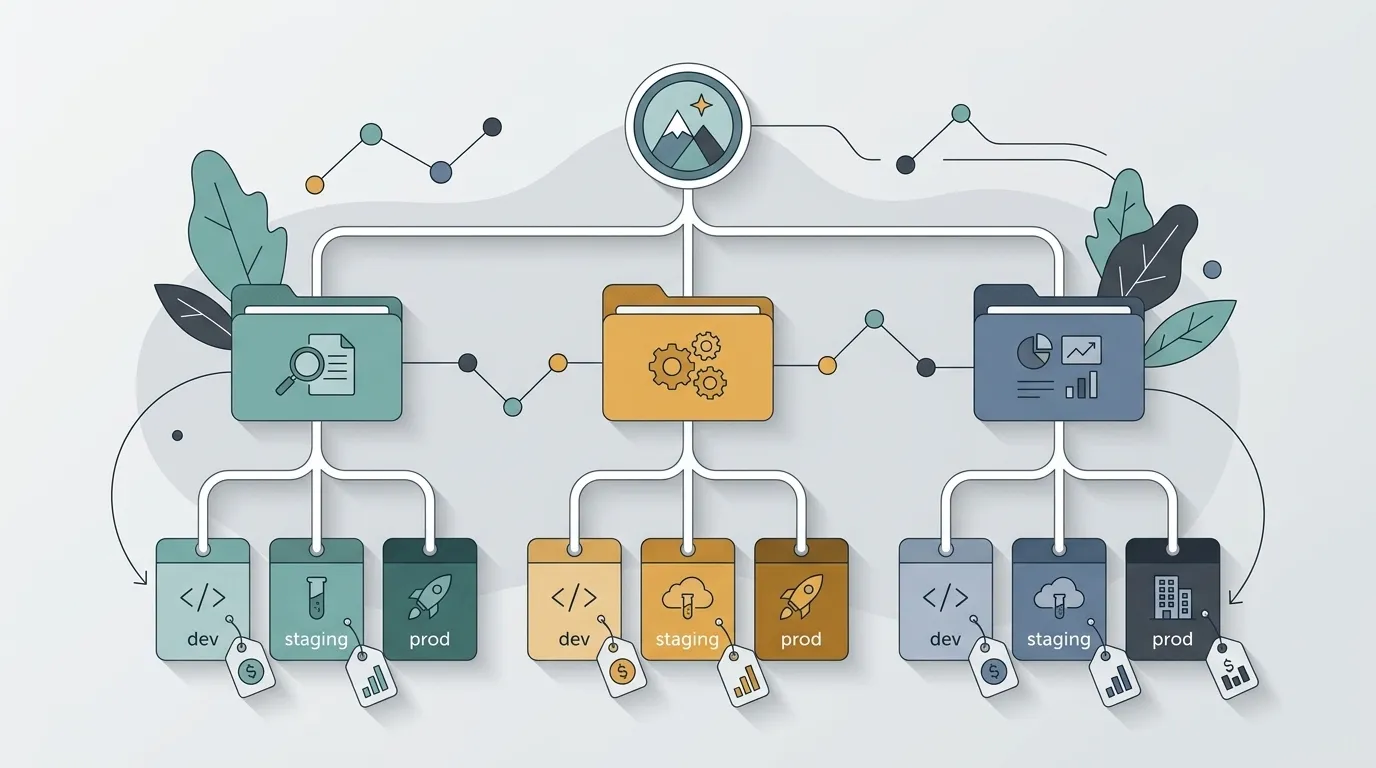
Before spinning up your first VM, think about the hierarchy: Organization at the top, Folders by area or environment, and Projects as isolation units. One project per environment (dev, staging, prod) is the bare minimum — quota, IAM, and billing stay separate at no extra cost.
Link each project to a Billing Account and add team and cost-center labels to everything. Without labels, the cost report is a blur. With labels, you can answer “how much did team X spend this month?” in thirty seconds.
IAM: least privilege, always

The classic mistake is giving everyone the Editor role because “it’s faster.” It is fast until someone deletes a production bucket. Start with the narrowest predefined roles and only increase access when there is a real need.
Use Service Accounts per workload, never the project’s default account. Avoid downloading JSON keys — prefer Workload Identity Federation and impersonation, which keep secrets from circulating. Also review bindings from time to time: Policy Analyzer shows who can do what before it becomes bad news.
Prefer managed services over “I’ll run it myself”
GCP is not VM rental. Every time you spin up a machine to run Postgres yourself, you take on backups, patching, high availability, and overnight on-call duties. Cloud SQL, Pub/Sub, Cloud Run, and BigQuery exist precisely so you do not have to do that.
The price of a managed service can look scary on paper, but that cost fades when you add up the engineering hours a raw VM consumes. Save Compute Engine for what genuinely does not fit a managed service — not for what you are simply reluctant to migrate.
Cost should not be a surprise at the end of the month
Create Budgets with alerts at 50%, 90%, and 100%, sending notifications to email and a Pub/Sub topic. This does not prevent spending, but it warns you before the bill comes as a shock. Also enable cost reports using the labels you defined at the beginning.
Check Recommendations regularly: idle VMs, orphaned disks, committed use discounts. That is money sitting on the table. Add a retention policy to the mix — forgotten logs and storage are the cloud’s quietest recurring charge.
If you cannot see it, you cannot control it
Cloud Logging and Cloud Monitoring are already enabled; the mistake is never looking at them. Build dashboards for what matters (latency, error rate, saturation) and real notification policies — not a pretty chart that no one opens.
Set a deliberate log-retention period, because not everything needs to live for 400 days. Use log-based metrics to turn that recurring error line into an actionable alert before the customer tells you there is a problem.
Clicked once? Version it forever
Configured something in the console to test it? Great, you learned how it works. Now throw it away and recreate it in Terraform. A resource created by clicking around is a resource no one can reliably recreate later — and one that becomes the classic “don’t touch it, it works.”
With infrastructure as code, you gain review, history, and reproducibility. As a bonus, half of IAM and billing mistakes show up in the pull request diff, well before reaching production.
Good GCP practices are not about memorizing services; they are about habits: organize, restrict, delegate to managed services, watch costs, and version everything. Do this from day one, and your future self, six months from now, will thank you.