
Every AI assistant hits the same wall: it knows a lot, but it cannot see your systems. It does not read your repository, query your database or open a ticket in your support tool. For a long time, each product solved this its own way, with plugins and integrations that only worked there.
The Model Context Protocol (MCP) is the standard answer to that problem. It is an open protocol that defines how an AI assistant discovers and uses external tools and data. You write the integration once, as an MCP server, and it works in any compatible client: Claude, IDEs, your own agents.
This guide explains how MCP works and, above all, how to use MCP tools day to day, safely. If you want to build your own server, the sister article How to build an MCP server in Python with FastMCP walks through it step by step.
The three parts: host, client and server
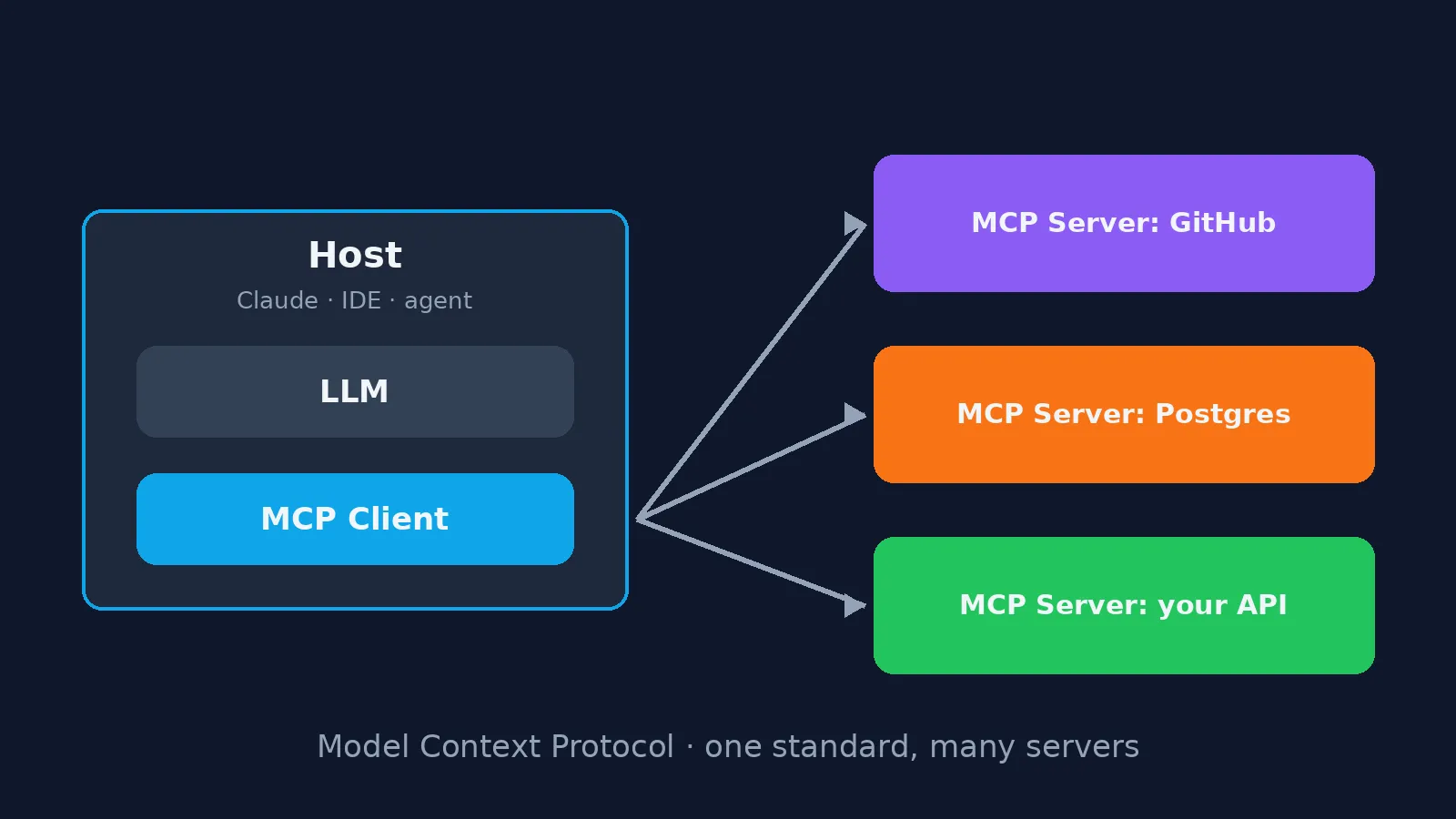
MCP splits responsibilities into three roles:
- Host: the application you use, such as Claude, an IDE or an agent. It holds the model and decides what to show you.
- MCP client: the component inside the host that speaks the protocol. Each client keeps one connection to one server.
- MCP server: the program that exposes a system. It can be a server for GitHub, for your database or for your company's API.
One host connects several servers at the same time. That is what lets an assistant check the repository, look at a metrics dashboard and update a ticket in the same conversation.
Client and server talk JSON-RPC over one of two transports: stdio, when the server runs as a local process on your machine, and HTTP (Streamable HTTP), when the server is a remote service.
What a server offers
An MCP server can publish three kinds of things, and each one has a different "owner":
| Part | Who decides to use it | Example |
|---|---|---|
| Tools | the model | search_books, create_issue, run_query |
| Resources | the application | the project README, a record, a configuration file |
| Prompts | the user | a ready-made command such as "review this PR" |
Tools are the part that changes the experience the most: with them the assistant stops only answering and starts acting.
How a tool call happens
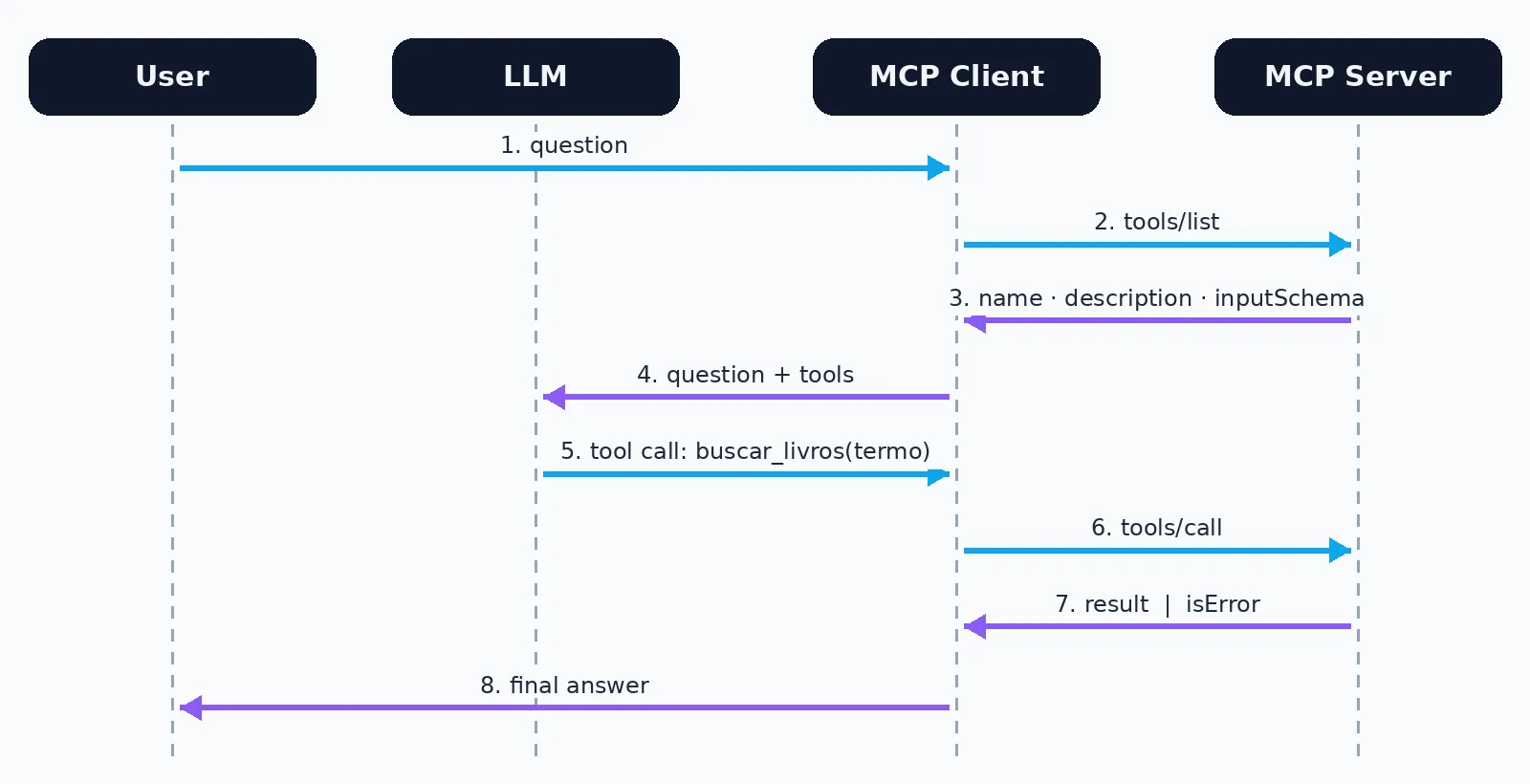
When you ask a question, the flow is:
- The client asks the server for its list of tools (
tools/list). Each one comes with a name, a description and a JSON Schema of its arguments. - The host hands your question to the model together with that list.
- The model decides whether a tool helps and builds the arguments following the schema.
- The client runs the call on the server (
tools/call) and returns the result to the model. - The model reads the result and answers, or calls another tool.
The key point: the model picks the tool by reading its description. A poorly described tool gets ignored or used at the wrong moment. And when a call fails, the server returns a result flagged as an error, with a message the model reads and can use to fix its next attempt.
Connecting an MCP server to Claude
In Claude Code, one command adds a server:
# remote server, over HTTP
claude mcp add --transport http github https://api.githubcopilot.com/mcp/

# local server, over stdio (Claude starts the process)
claude mcp add library -- python /path/to/server.py
Then claude mcp list shows the servers and the state of each connection, and the /mcp command inside a session lets you authenticate or reconnect. In the Claude app, the equivalent path is adding a connector in the settings. In every case the rule is the same: the host learns that server's tools.
Using MCP tools day to day
With the server connected, you do not call tools by name: you describe what you want. A few habits make a difference:
- Ask for the outcome, not the step. "List the open issues labelled bug and summarise the three oldest" works better than "call list_issues".
- Give the context the tool lacks. Repository name, environment, time range. The model fills the arguments with what you tell it.
- Read the confirmation prompt. Tools that write data usually ask for approval. Check the arguments before approving, especially in production.
- Use the server's prompts. When a server offers prompts, they already know how to combine the right tools for common tasks.
- Prefer a few well-chosen servers. Every connected tool takes space in the model's context and is one more option for it to get wrong.
Security: what to check before connecting
An MCP server acts on your behalf. Treat the connection the way you would treat handing out an access key to a system:
- Trust the source. Install servers from known sources and review what a local server runs on your machine.
- Least privilege. Give the server's token only the access the task needs. A server that only reads does not need write permission.
- Beware of external content. A web page, an email or a document read by a tool can hide instructions. The model must not treat them as your orders, and you should be suspicious when the assistant proposes an action you did not ask for.
- Separate reads from writes. Keep write tools behind confirmation and review what they did.
- Log and review. In a team setting, prefer servers that log calls, so you know who did what.
MCP, APIs and plugins: what is the difference
MCP does not replace your API. It is a thin layer on top of it, designed for models: it describes each operation in a way the model understands, standardises errors and discovery, and lets the same server work in any host. A REST API is still the contract between systems; the MCP server is the contract between your system and an assistant.
Where to start
Connect a server that solves a real pain in your routine, such as your repository's or your ticketing system's, use it for a week with the practices above, and watch where the assistant gets it right and where it needs more context. When your company has a system that has no server yet, the next step is to build your own: with FastMCP, in Python, it takes an afternoon.